Annotating an LLM Plan Without Losing the Thread
How I use Herdr Annotations to select exact lines from an agent's plan, attach focused comments, and send a coherent review back in one prompt.

An LLM plan is rarely entirely right or entirely wrong.
More often, most of the plan is useful, but a few specific decisions need attention. One step assumes the wrong data source. Another expands the scope too far. A third misses an important constraint that was discussed earlier.
Responding with “change the database part” or “the deployment step needs work” leaves the agent to guess which sentence I mean. Copying each passage manually works, but doing it several times turns a focused review into a sequence of selecting, copying, switching context, formatting quotes, and reconstructing the prompt.
I wanted reviewing an agent’s plan to feel closer to commenting on a document: select the exact passage, attach a note to it, continue reading, and send the complete review when I am ready.
That is the use case behind Herdr Annotations.
The Missing Feedback Loop
Coding agents are good at producing structured plans. The terminal is also a good place to read them because it is already where the repository, commands, and agent conversation live.
The awkward part begins when I want to respond to individual lines.
Suppose an agent proposes the following decisions across a longer plan:
Store all session state in Redis.
I may want to respond:
Keep durable session state in Postgres. Redis should remain a cache for this path.
Later in the same plan, it might say:
Rebuild the indexing pipeline before adding the new source.
My feedback may be:
This makes the change too broad. Keep the current pipeline and add the new source behind an adapter.
Both comments make sense only when they remain attached to the passages that prompted them. If I write the comments without the source text, the agent has to infer the relationship. If I repeatedly copy and format every quote myself, I spend more effort assembling feedback than thinking about it.
Herdr Annotations keeps those two pieces together: the selected text and the comment about it.
How I Use It
The interaction is intentionally small.
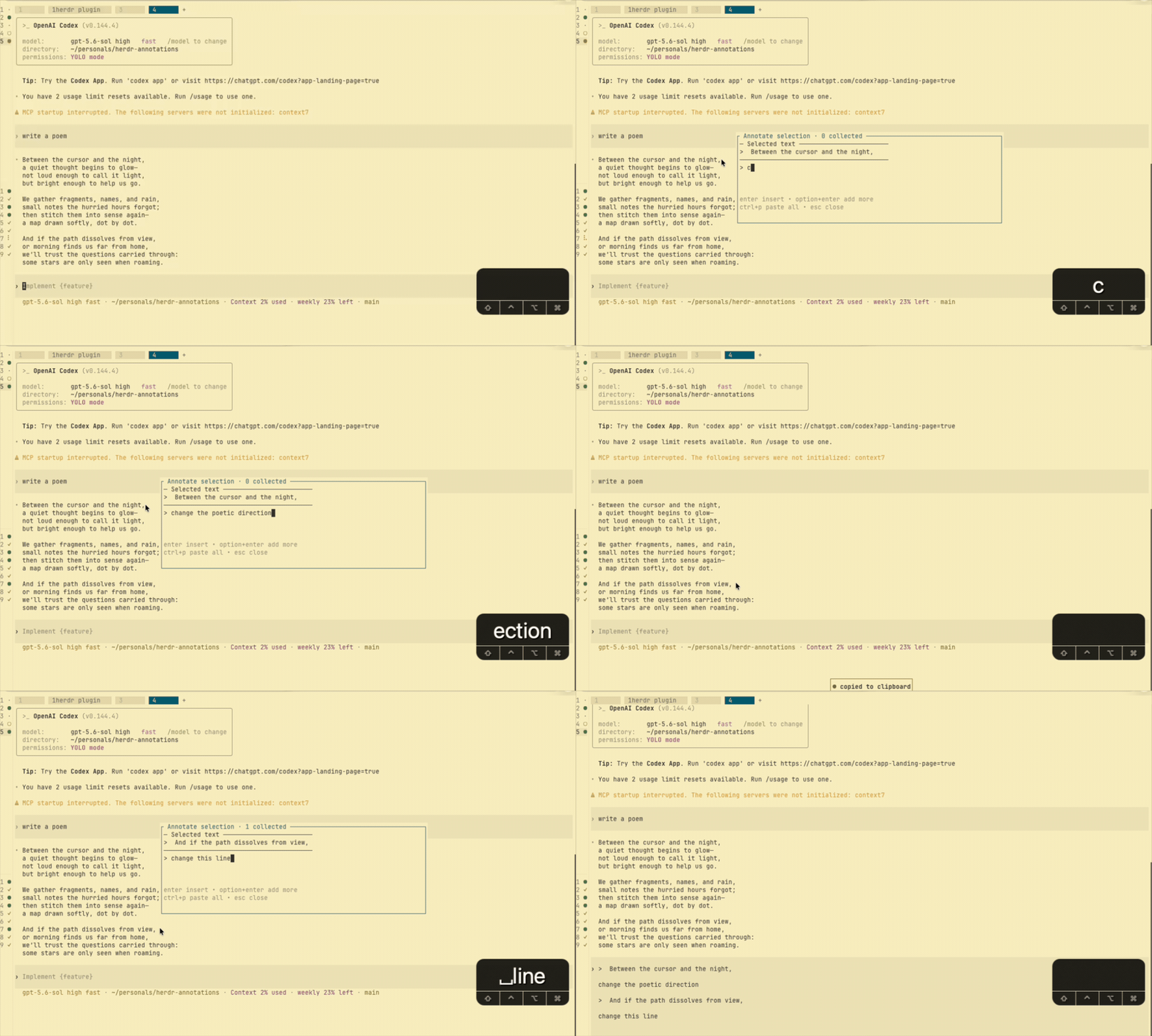
- I select a specific passage in the terminal pane.
- I press the annotation shortcut.
- A compact popup shows the selected passage so I can confirm the context.
- I write the comment I want to attach.
- I either insert that annotation immediately or choose Add more and continue reviewing.
When I find another decision that needs feedback, I repeat the same action. The collection preserves the annotations in the order I captured them. After the final comment, I paste the complete collection into the agent’s pane as one review.
The plugin does not submit the prompt for me. It inserts the formatted feedback and leaves it at the terminal prompt, where I can read it, add a broader instruction, or change the wording before pressing Enter.
That last pause matters. The plugin helps assemble the review; it does not take over the conversation.
Why “Add More” Matters
The immediate action is useful when one line needs one response. The collection is what makes plan review useful.
A plan may contain several independent issues:
- one incorrect assumption;
- one step that needs narrower scope;
- one missing failure case;
- one decision that should be confirmed before implementation.
I do not want to interrupt the review after every selection by sending a separate prompt. I also do not want to keep a temporary document open beside the terminal just to hold quotes.
Add more lets me stay in review mode. I capture a passage, add the note, close the popup, and keep reading. Once the review is complete, the collected feedback becomes a single prompt with explicit context around every comment.
The result is easier for the agent to act on and easier for me to verify. Instead of a vague request to revise the plan, the agent receives a small set of grounded decisions.
It Is Not Only for Plans
LLM plans are the reason I wanted the plugin, but the same pattern appears elsewhere in terminal work.
I can annotate:
- an error message with the behavior I expected;
- a command with a question about one flag;
- an agent response with a correction to a specific claim;
- review output with a decision about what should be fixed now;
- debugging evidence with a note about why a line is relevant.
The common thread is not note-taking. It is precise feedback. The selected text is evidence; the annotation explains what I want the recipient to understand or change.
Keeping the Tool Small
I did not want to build another notes application around this interaction.
Herdr Annotations does not create a cloud account, sync terminal content, or capture the entire pane. It works with text I explicitly select. Collected annotations remain local to the machine running Herdr, and the plugin clears an active collection only after it has been inserted successfully.
It also does not attempt persistent inline highlights. The terminal remains the terminal. The popup exists only long enough to connect a selected passage with a comment and decide whether to insert it or keep collecting.
That narrow boundary is part of the appeal. I can use it during a conversation with an agent without moving the conversation into a different product.
Trying It
Herdr Annotations requires Herdr 0.7.4 or later and Node.js 20.17 or later. Install it from GitHub:
herdr plugin install jagzmz/herdr-annotationsThe suggested shortcuts are:
Control+Option+Aon macOS to annotate selected text;Control+Option+Von macOS to paste annotations already collected;Control+Pinside the popup to paste the collection with the current annotation;Option+Enterinside the popup to add the current annotation and continue reviewing.
Herdr uses alt as the cross-platform configuration name for the macOS Option key. Windows and Linux users can use the corresponding Control+Alt shortcuts. Keybindings are opt-in, so the installation guide includes the configuration and conflict-checking steps.
After configuration, the working rhythm is simple: select, annotate, add more, and paste when the review is complete.
Better Feedback Starts With Better References
The quality of an agent’s revision depends partly on the quality of the feedback it receives. A broad instruction such as “improve this plan” gives the model freedom, but it also leaves room for it to solve the wrong problem.
Quoting the exact decision and attaching a focused comment removes that ambiguity. It tells the agent what I am responding to, what constraint matters, and where the plan should change.
Herdr Annotations is a small tool for making that feedback loop faster. It does not make decisions for me. It gives each decision a clear place to respond.
The plugin and its usage documentation are available at github.com/jagzmz/herdr-annotations.